
Hold 'Em Helper1.4.1 - App Store
You'll be able to see results in few seconds.
Publisher Description


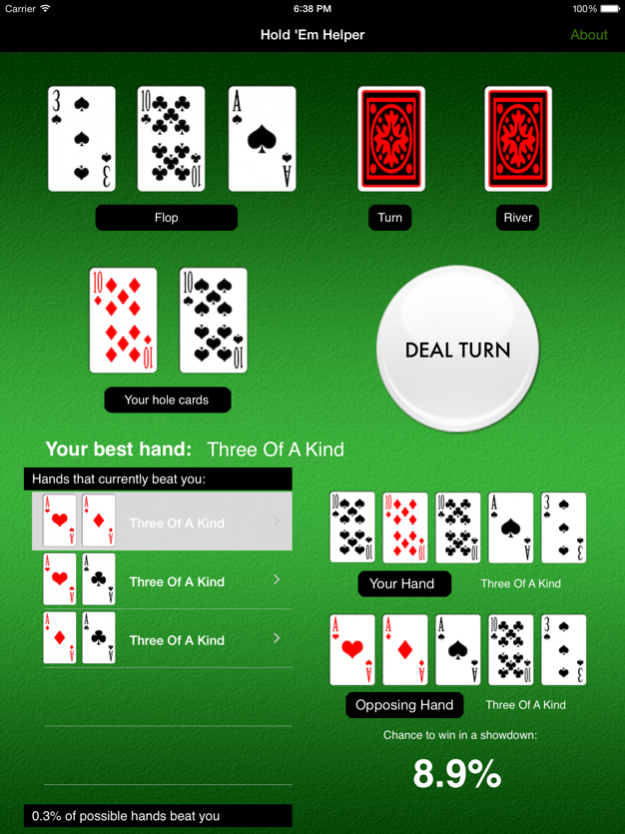

Hold ‘Em Helper is a Texas Hold ‘Em poker training and practice tool for beginners and experts alike. Not just an everyday odds calculator, Hold ‘Em Helper takes a new approach by putting you in the mind of the player as you progress through a hand. Starting with a simulated set of hole cards, Hold ‘Em Helper deals the flop, turn and river cards with the press of the dealer button. For each hand, Hold ‘Em Helper lets you examine all of the hands that beat you at each point in the hand, and calculates your odds of winning a heads up showdown. Don’t like your hand? Just shake your iPhone to fold and deal a new one!
Hold ‘Em Helper is a great way to build your intuition and insight about the strength of Texas Hold ‘Em hands. Beginners and even experts often over value or under estimate the strength of their hands, getting them into trouble at the poker tables. With Hold ‘Em Helper you can easily play through many poker hands and situations that arise during real games, learning valuable lessons about hand strength before it’s too late!
INSTRUCTIONS:
-Deal random cards by hitting the large white button, or tap the cards before each deal to set them however you want.
-Select any hand at the bottom of the screen by clicking on it to see odds calculations, pre-flop, post-flop and post-turn.
Comments or suggestions? Email us at info@smappsoft.com
May 14, 2015 Version 1.4.1
This app has been updated by Apple to display the Apple Watch app icon.
Bug fixes
About Hold 'Em Helper
The company that develops Hold 'Em Helper is Smappsoft. The latest version released by its developer is 1.4.1.
To install Hold 'Em Helper on your iOS device, just click the green Continue To App button above to start the installation process. The app is listed on our website since 2015-05-14 and was downloaded 0 times. We have already checked if the download link is safe, however for your own protection we recommend that you scan the downloaded app with your antivirus. Your antivirus may detect the Hold 'Em Helper as malware if the download link is broken.
How to install Hold 'Em Helper on your iOS device:
- Click on the Continue To App button on our website. This will redirect you to the App Store.
- Once the Hold 'Em Helper is shown in the iTunes listing of your iOS device, you can start its download and installation. Tap on the GET button to the right of the app to start downloading it.
- If you are not logged-in the iOS appstore app, you'll be prompted for your your Apple ID and/or password.
- After Hold 'Em Helper is downloaded, you'll see an INSTALL button to the right. Tap on it to start the actual installation of the iOS app.
- Once installation is finished you can tap on the OPEN button to start it. Its icon will also be added to your device home screen.
Program Details
System requirements
Download information
Pricing
Version History
version 1.4.1
posted on 2015-05-14
May 14, 2015 Version 1.4.1
Bug fixes
version 1.4.1
posted on 2015-05-14
May 14, 2015 Version 1.4.1
This app has been updated by Apple to use the latest Apple signing certificate.
Bug fixes
version 1.4.1
posted on 2015-05-14
May 14, 2015 Version 1.4.1
This app has been updated by Apple to display the Apple Watch app icon.
Bug fixes
version 1.4.1
posted on 2009-10-07
version 1.4.1
posted on 1970-01-01
2015年5月14日 Version 1.4.1
This app has been updated by Apple to use the latest Apple signing certificate.
Bug fixes
version 1.4.1
posted on 1970-01-01
14 de may. de 2015 Version 1.4.1
This app has been updated by Apple to use the latest Apple signing certificate.
Bug fixes
version 1.4.1
posted on 1970-01-01
2015年5月14日 Version 1.4.1
Bug fixes
Disclaimer
Official App Store Link
We do not host Hold 'Em Helper on our servers. We did not scan it for viruses, adware, spyware or other type of malware. This app is hosted by Apple and passed their terms and conditions to be listed there. We recommend caution when installing it.
The App Store link for Hold 'Em Helper is provided to you by apps112.com without any warranties, representations or guarantees of any kind, so access it at your own risk.
If you have questions regarding this particular app contact the publisher directly. For questions about the functionalities of apps112.com contact us.
